
🍪 This site uses cookies to improve your experience. Cookie Policy · Privacy Policy
Developer-friendly, cryptographically secure password generation. Supports JSON, CSV, and plain text output. Live API simulator with code examples in 5 languages. No server transmission, ever.
A short password falls instantly, however random it looks. The table and chart below model an offline attack at 10,000,000,000 guesses per second against a fast hash — the same maths a cracking rig actually runs.
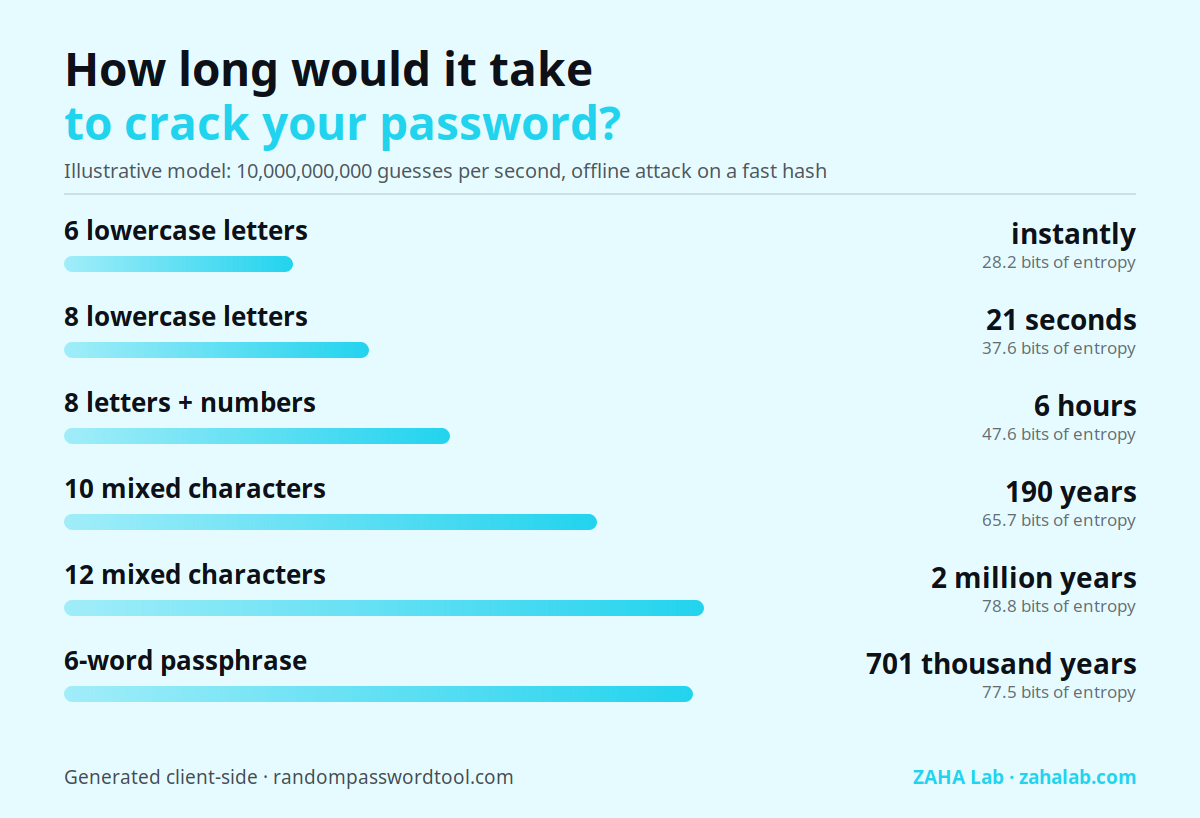
| Password pattern | Time to crack | Entropy (bits) | Verdict |
|---|---|---|---|
| 6 lowercase letters | instantly | 28.2 | Weak |
| 8 lowercase letters | 21 seconds | 37.6 | Weak |
| 8 letters + numbers | 6 hours | 47.6 | Moderate |
| 10 mixed characters | 190 years | 65.7 | Moderate |
| 12 mixed characters | 2 million years | 78.8 | Strong |
| 6-word passphrase | 701 thousand years | 77.5 | Strong |
Assumes uniform random characters and no rate limiting. Password reuse or a breach database shortcut all of the above, which is why a unique password per account matters more than length alone.
Hit SEND REQUEST to generate passwords via crypto.getRandomValues()
ℹ️ This is a client-side simulation. No network request is made. Generated passwords never leave your device.
curl -X GET \
  "https://randompasswordtool.com/api/v1/generate?count=5&length=20&charset=ulns&format=json" \
  -H "X-API-Key: YOUR_API_KEY" \
  -H "Accept: application/json"
import requests
response = requests.get(
"https://randompasswordtool.com/api/v1/generate",
params={"count": 5, "length": 20, "charset": "ulns", "format": "json"},
headers={"X-API-Key": "YOUR_API_KEY"}
)
passwords = response.json()["passwords"]const params = new URLSearchParams({
count: 5, length: 20,
charset: "ulns", format: "json"
});
const res = await fetch(
`https://randompasswordtool.com/api/v1/generate?${params}`,
{ headers: { "X-API-Key": "YOUR_API_KEY" } }
);
const { passwords } = await res.json();$ch = curl_init();
curl_setopt_array($ch, [
CURLOPT_URL => "https://randompasswordtool.com/api/v1/generate?count=5&length=20&charset=ulns&format=json",
CURLOPT_HTTPHEADER => ["X-API-Key: YOUR_API_KEY"],
CURLOPT_RETURNTRANSFER => true,
]);
$result = json_decode(curl_exec($ch), true);
$passwords = $result["passwords"];package main
import (
"encoding/json"
"fmt"
"net/http"
"net/url"
)
func main() {
params := url.Values{
"count": {"5"}, "length": {"20"},
"charset": {"ulns"}, "format": {"json"},
}
req, _ := http.NewRequest("GET",
"https://randompasswordtool.com/api/v1/generate?"+params.Encode(), nil)
req.Header.Set("X-API-Key", "YOUR_API_KEY")
// … decode JSON response
_ = json.NewDecoder(resp.Body).Decode(&result)
}Every generation uses crypto.getRandomValues(), the same entropy source that secure shells and encrypted messaging apps rely on. Zero server transmission. Always.
Powered by crypto.getRandomValues(), the browser's native CSPRNG backed by OS-level entropy (/dev/urandom / CryptGenRandom). Meets NIST SP 800-90A standards.
Generate passwords in JSON, CSV, or plain text. Copy-paste code snippets in cURL, Python, JavaScript, PHP, or Go, adapt parameters and integrate in seconds.
Validate passwords against the HIBP breach corpus using SHA-1 k-anonymity. Only a 5-character hash prefix leaves your device, the full password never transmits.
Generate up to 100 passwords at once. Perfect for provisioning CI/CD secrets, test fixtures, batch user accounts, or temporary credentials.
Every parameter change updates the URL, query string, and code snippets instantly. No reload needed, what you see is what your integration will call.
Open DevTools and watch the Network tab, zero requests are made during generation. Every password is created client-side with verifiable entropy.
Every password can be validated against the HaveIBeenPwned breach corpus without exposing the actual password. The k-anonymity API means only a partial hash prefix leaves your device.
When you check a candidate password, SHA-1 hash it, send the first 5 characters to the HIBP k-anonymity API at api.pwnedpasswords.com/range/{prefix}, then check whether the full hash appears in the response. The actual password is never transmitted, only a partial hash prefix. This pattern is required by NIST SP 800-63B 2025 as a SHALL requirement at credential creation.
Each tool in this portfolio serves a distinct audience and use case.
Math.random() uses the Mersenne Twister PRNG, its 19,937-bit internal state can be fully recovered after observing 624 consecutive outputs. This makes generated passwords statistically predictable. Use crypto.getRandomValues(), which reads from the OS-level CSPRNG (/dev/urandom on Linux, CryptGenRandom on Windows) and cannot be predicted from observed outputs.crypto.getRandomValues(), which is consistent with NIST SP 800-90A (Recommendation for Random Number Generation Using Deterministic Random Bit Generators) and RFC 4086 (Randomness Requirements for Security). It is the only browser-native random source appropriate for cryptographic use.gh secret set or your secrets manager of choice. Example: curl "…/generate?length=32&format=text" | gh secret set DB_PASSWORD. Never log the generated value in workflow output, use masked environment variables.u=uppercase (A-Z), l=lowercase (a-z), n=numbers (0-9), s=symbols (!@#$), a=exclude ambiguous characters (0,O,l,1,I). Combine freely: charset=uln gives alphanumeric only, useful for AD passwords with legacy system restrictions.X-RateLimit-Limit, X-RateLimit-Remaining, X-RateLimit-Reset. The API simulator on this page runs entirely client-side and does not count against limits.crypto.getRandomValues() entirely in your browser. No generated password reaches any server. Network requests during simulation: zero. You can verify by opening DevTools → Network and running the simulator.text format and process with awk or xargs.Hardware and software recommendations verified by our team.
Hardware security key, phishing-proof 2FA for all your accounts.
Check price →Multi-device antivirus, VPN, and identity protection suite.
Check price →Whole-home VPN router, protect every connected device.
Check price →As an Amazon Associate we earn from qualifying purchases.